
Windows and Dock
7 tools
A switcher with a preview of every window, previews and clicks on the Dock, layouts that snap, a green button that fills the screen, and Spaces that stay where you put them.
Drawn in code with a boiling ink line, alive at cel speed, and leveled up by your real Claude Code work. She minds your terminals, barks when one needs you, and carries a toolbox of seventy seven Mac utilities in her own hand.
macOS 14+ on Apple Silicon. Free and open source. Your work stays on your Mac.
name me…

Ball Toss. Every frame redrawn in code, wobbling on purpose.
The pet part
She floats above every window and treats your screen like a backyard.

Grab her, drag her, send her flying. Real physics, a proper tumble, and a squash on landing.

One tap and she runs her Ball Toss, ball off the nose, clean catch. On the hour she does one all on her own.

Press and hold and she melts into heart eyes. Let go and the tail keeps going.

A big hello when your morning starts. Sleepy yawns after 11pm. She keeps your schedule better than you do.
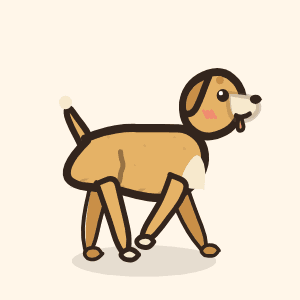
Flick the ball across your screen. She bolts after it, snatches it up, and trots it right back to your cursor.
Between tricks she wanders your screen, reminds you to stretch, and gives you a heads up when your battery runs low.
The game part
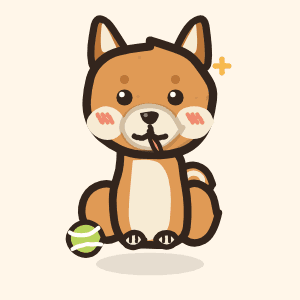
Ship real work and the desk gets livelier. Fifty levels, and ninety one things to earn: coats, breeds, every fit and every den. Six more breeds join from level 8, and the Galaxy coat waits at the very top.
which coat today?

try a coat
12 coats, Galaxy at Lv 17
try a coat

try a coat

try a coat

try a coat

try a coat

try a coat
The dress up part
Thirty two hand-inked fits across headwear, eyewear, neckwear, extras and a shelf of legends. A party hat for ship days, a grinning ghoul muzzle for deadline nights, and a bee friend who just hovers.
the beret. obviously.











Every fit is free, and so is every coat and every breed. Nothing in Maika is ever for sale.
The home part
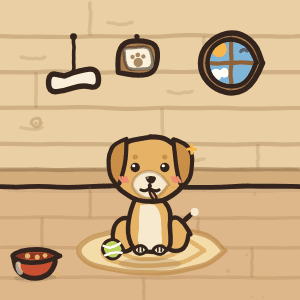
Take her home and the window becomes a little room with her inside. Sixteen hand-drawn interiors: six everyday homes and ten legend rooms that match the legends shelf, from a shadow gate with eyes in the arch to a galley under a pirate flag.
home is where the bowl is
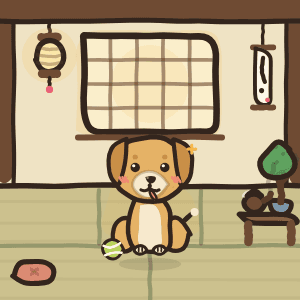
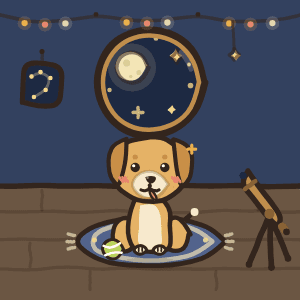
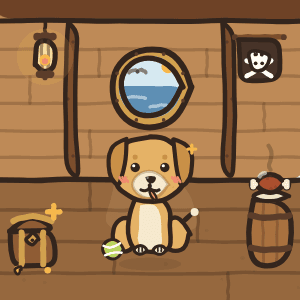
Kuro is at the door!
two Macs, one room, zero servers
Open the den door and nearby Maikas can come over. A friend knocks, you approve, and their dog walks into your house wearing whatever coat, breed and fit they own, name tag and all. Tricks and barks play on every screen, and the window stretches into a yard while company is over. Up to six dogs a room, and the host can always send someone home.
Rooms are Bluetooth and local WiFi only, straight from Mac to Mac. Dogs travel as a few dozen bytes of drawing instructions, never images, and every Mac redraws its guests with its own wobbly ink. Nothing is stored, nothing touches the internet, and the room evaporates when the door closes.
All sixteen homes are free for everyone, the same way the wardrobe is.
The Claude part
Run Claude Code and she quietly keeps watch. Every session gets a name, and she tells you the moment one finishes, gets stuck waiting, or fills up.

watching portfolio…
portfolio is done!
woof! maika-web (fix-auth) needs you
woof! portfolio needs a compact soon
your sessions, as she sees them
right-click your pup anytime
When a session needs you and you are off in another app, she gives one soft bark and says which terminal wants you back. Never while you are already there.
Stepped away? Right-click her for the last word on every session. Still working, waiting for you, done, or hit an error, each with how long ago.
She reads how full each session’s context is and warns you before it needs a compact, so nothing dies mid-thought while you are away.
Session names come from the folder, the branch, and a numbered seat, so five terminals never look alike. She never shows what you typed, and all of it stays on your Mac.
The handy part
Seventy seven small tools for the Mac she lives on, every one redrawn in her own paper and ink. Click her paw and the box opens. It starts empty, and a tool does nothing until you put it in.
which one do you need?
7 tools
A switcher with a preview of every window, previews and clicks on the Dock, layouts that snap, a green button that fills the screen, and Spaces that stay where you put them.







14 tools
Scrolling the way you like it, side buttons that go back and forward, a filter for a button or a key that chatters, snippets that type themselves, and a guard on ⌘Q.














7 tools
A history of what you copied, paste without the formatting, cut and paste in the Finder, a shelf to park files on, and links that lose their tracking.








5 tools
A volume for every app, the output you want with one shortcut, the devices you prefer in the order you prefer them, and a mute for the mic from anywhere.





4 tools
A Mac that stays awake when you ask, brightness for every display from one place, a little extra on XDR, and Bluetooth that sleeps when the Mac does.



19 tools
Screenshots and recordings with their own editors, a Command Bar, a wheel of your favourite actions, text read off the screen, a colour picker, a scratchpad, and the chores: cleaning, uninstalling, updating.



















13 tools
Your music, timers and the day ahead at the top of the screen, with lyrics, what plays next, downloads, a calendar and Maika herself for company.














8 tools
The processor, the graphics, memory, the network, disks and the battery, read live and drawn small, plus the fans when you want a say in them.








Every tool has a mark in her own hand, drawn by the same ink engine that draws her. A tool you have not installed loads nothing and asks your Mac for nothing.
The up top part
Put the Dynamic Island in the box and your music, your timers and the day ahead hang from the top of the display. Black while it rests, a paper card when it opens.
resting
Keep awake04:59Standup, 10:002 arrivingThe song that is playing, with its lyrics and what comes next. Timers, downloads, the calendar and your notifications, each on a page of its own.
Her head sits beside the camera and looks up when something happens. When a long run finishes, she is the one who says so.
The Command Bar finds apps, files, windows, menus, settings and her own tricks. With the island on, it drops out of the island with her face on it.
The private part
Her XP is your output. Maika reads the token counts inside the Claude Code transcripts that already live in ~/.claude on your Mac, and turns them into levels.
Everything happens locally. The parsing runs on your machine, nothing is uploaded, and there is no account to create. Not even an email.
She works offline too. Unplug, keep building, and the XP still lands. Your Mac is her whole world.
The toolbox keeps the same manners. Only a handful of its tools ever reach the internet, each one when you use it, like checking your apps for updates, a speed test or lyrics from the web. Nothing from your transcripts goes with them, and the SECURITY file in her repo names every one.
 Lv 38·298.7M XP·today 0.6M·streak 10d
The open part
You do not have to take any of that on trust. Maika’s own code is open source under the MIT license, so the code that reads your transcripts is code you can read back. The engine under her toolbox is a fork of Vorssaint Utils and stays under its GPL-3.0.
A hand-drawn buddy who lives on your Mac.
Clone her, run her, take her apart.
git clone github.com/joewrdd/MaikaDogThen ./tool/install.sh. It needs Xcode, Flutter and CocoaPods, and your own signing team in the project. No keys, no signup.
FAQ
Yes. Maika reads token counts from the Claude Code transcripts already sitting in ~/.claude on your Mac. The math happens locally and nothing is ever uploaded.
No. No sign up, no server, no tracking. She is a dog, not a platform.
Apple Silicon Macs on macOS 14 or newer. She is not out yet, and will arrive as a plain DMG.
Your real Claude Code usage becomes XP, and XP becomes levels. There are fifty of them, and almost every one hands you something: coats, fits, dens, and six more breeds along the way, Shiba at 8, Corgi at 14, Husky at 20, Dachshund at 27, Poodle at 35 and Malinois at 44. The Galaxy coat and the pirate galley are the level fifty prize. After that she just keeps counting.
Yes, any time from the menu bar. She asks for her name on first launch, and it never leaves your Mac.
The same way she levels. Claude Code keeps a transcript file per session, and she watches them change. The folder, the branch and a numbered seat become the session name, never the words you typed, and quiet time tells her who finished, who is waiting on you, and who is close to a compact. Nothing leaves your Mac.
Nothing, ever. Maika is free and open source: her own code under the MIT license, the toolbox engine under GPL-3.0. Every one of the 32 fits, all sixteen den houses, every coat and breed, fetch, play dates, the terminal watching and all seventy seven tools are in the one app. There is no Pro tier, no license key and no account. You can read every line of her on GitHub.
Seventy seven small utilities in eight groups: windows and the Dock, the mouse and keyboard, the clipboard and files, sound, energy and displays, everyday tools, the Dynamic Island and a system monitor. The box starts empty. You install the ones you want, and the rest load nothing and ask for no permission.
The work underneath is done by the engine of Vorssaint Utils, forked once and kept under its GPL-3.0 license. The screens are hers, redrawn in the same paper and ink as the dog.
Straight from Mac to Mac over Bluetooth and local WiFi, no server anywhere. Your friend knocks, you approve, their dog walks in. A dog travels as a few dozen bytes of drawing instructions, never images, and everything evaporates when the door closes. Nobody can enter without your yes, and the host can send anyone home.